
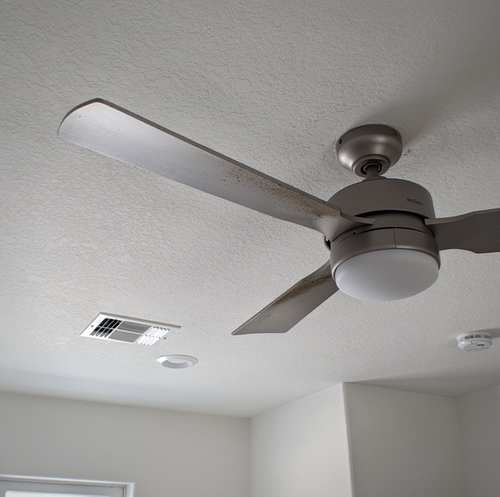
A ceiling fan that shudders overhead or hums through a quiet room is not just annoying. It is telling you something specific about the spinning assembly bolted to your ceiling. Once you understand the two separate problems at work, the fixes stop feeling like guesswork.
Quick Answer: A ceiling fan wobbles when the spinning blade assembly is out of balance, and it makes noise when something is loose, rubbing, or mounted on the wrong hardware. Wobble usually traces to uneven blade weight, bent or warped blades, or a loose canopy. Noise traces to loose screws, worn motor bearings, or a control that the motor was never designed to run on.
What Actually Happens When a Fan Wobbles
Think of the blade assembly the way a mechanic thinks about a car wheel. A tire that is even slightly out of balance rides smoothly at low speed and then shakes the whole steering wheel once you hit highway speed. A ceiling fan behaves the same way. At the lowest setting, a small imbalance stays hidden, but as the blades pick up speed, the heavier side pulls the whole assembly in a circle, and that force travels up the downrod and into the mount.
So wobble is almost always a balance problem, not a "the fan is broken" problem. A few things throw that balance off:
- Unequal blade weight- Blades leave the factory matched as a set. If one blade is heavier or one has collected more grime than the others, the set no longer spins as a balanced unit.
- A bent or warped blade- A blade that is no longer flat, or one that sits at a slightly different angle than its neighbors, carries air unevenly, and pulls the fan off center.
- Blades at different heights- Each blade should hang the same distance below the ceiling. One blade drooping lower than the rest means the blade holders, sometimes called blade irons, are bent or loosely bolted.
- Uneven dust buildup- Dust does not land evenly. A thick coat on one or two blades adds weight exactly where you do not want it.
- A loose canopy or downrod- The canopy is the cup that covers the mount at the ceiling. If the downrod connection has worked loose, the entire fan gets to sway before the blades even factor in.
- The wrong mounting hardware- This is the serious one, and it deserves its own section below.
Why a Fan Makes Noise
Noise is a different family of problem from wobble, though the two often show up together because a wobbling fan shakes its own parts loose.
A clicking, ticking, or rattling sound is nearly always something loose: blade screws, light-kit screws, the canopy, or a glass shade that is not seated tightly in its holder. A fan that wobbles hard enough can even tap the canopy against the ceiling with each rotation, producing a rhythmic knock in time with the spin.
A hum or grind is a deeper issue. A steady mechanical grinding or a low growl usually comes from the motor bearings, the small components that let the shaft spin freely. When they run dry or wear out, metal drags on metal. A separate electrical buzz can come from the capacitor inside the motor housing, the part that helps drive the fan through its speed settings.
Then there is the sneaky one: a fan that hums only when you run it from a particular wall switch. That points away from the fan itself and toward the control feeding it, which is worth understanding before you start unscrewing anything.
Fixes You Can Safely Try Yourself
None of the following requires opening the ceiling box or touching wiring. Before you start, turn the fan fully off and let the blades stop completely.
- Tighten everything you can reach- Work around the fan and snug up every visible screw: the ones holding each blade to its holder, the screws where the holders meet the motor, the light-kit screws, and the small setscrews on the canopy. A large share of noise complaints end right here.
- Clean the blades evenly- Wipe every blade with the same cloth and the same pressure so you are not stripping grime off three blades and leaving it caked on two. Even cleaning keeps the weight balanced.
- Measure blade height- Hold a ruler or yardstick from the ceiling to the tip of one blade, then slowly rotate the blades by hand and measure each one at the same spot. They should all land within a small fraction of an inch of each other. A blade that reads high or low is your wobble suspect.
- Use a balancing kit- These inexpensive kits include a plastic clip and a set of stick-on weights, and they let you correct an imbalance without replacing anything.
- Check the control- If the fan hums only on a dimmer or an unusual wall switch, stop and read the mounting and control notes below rather than fighting the noise.
The One Fix That Is Not Optional: A Fan-Rated Box
Here is the part that separates a nuisance from a hazard. A ceiling fan must hang from an electrical box or mounting brace that is UL-listed for fan support. A standard light box, the kind that holds a flush fixture, is built to carry a static weight that never moves. A fan is heavy and, more to the point, it vibrates continuously for years. That constant motion works fasteners loose over time, and a fan hung on a box never meant to carry it can eventually pull the box straight out of the ceiling.
You cannot always tell from below whether the right box is up there, which is one reason a persistent wobble is worth taking seriously rather than living with. Swapping a standard box for a fan-rated box or brace means working inside the ceiling box, and that is licensed-electrician territory. The power has to be shut off at the breaker, the existing box removed, and a rated brace secured to the framing so it can carry both the weight and the shaking. This is not a "tighten a screw" job.
When the Control Is the Real Problem
If your fan hums on a wall switch, look at what that switch actually is. A standard lamp dimmer chops the electrical waveform to dim a light bulb, and a fan motor does not tolerate that treatment. Fed through a dimmer, the motor tends to buzz audibly and can run hot, which shortens its life. A fan needs a fan-rated speed control designed for a motor, not a light dimmer. Replacing a wall control involves wiring at the switch box, so it belongs with a licensed electrician and the breaker off.
Know When to Stop and Call
Some symptoms are your cue to bring in a pro rather than keep tinkering:
- A grinding or growling motor, which usually means worn bearings or a failing capacitor.
- Any hum tied to a switch or dimmer that needs the control replaced.
- A wobble that continues after you have tightened, cleaned, balanced, and re-measured, which often means the mounting hardware is the culprit.
- Anything that requires opening the ceiling box, replacing the box or brace, or touching wiring.
A humid coastal setting adds one more wrinkle worth knowing. Moisture in the air swells and warps wood or low-cost composite blades, which is a slow, year-round process rather than a one-season event. Warped blades throw off the balance you worked to set. Damp-rated or outdoor-rated blades resist that swelling and hold their shape far better in a room that stays humid.
Frequently Asked Questions
Measure from the ceiling to the tip of each blade at the same point in its rotation. A blade that sits noticeably higher or lower than the others is your off-balance culprit. To confirm which blade carries too much weight, a stick-on balancing kit includes a clip weight you move from blade to blade; the blade where the wobble smooths out the most is the heavy one.
Yes. Fan-rated boxes are stamped with a weight rating, commonly 35 pounds for a standard fan and up to about 70 pounds for heavier models. They mount either as a pancake box screwed directly to solid framing or on an expanding brace bar wedged between two joists, both of which a plain light box lacks. That rating and mounting method are what allow the box to carry both the weight and the constant motion, rather than working its fasteners loose over the years.
A fan needs a dedicated fan-speed control, or the specific wall or remote control listed by the maker for that model, rather than a general lamp dimmer. Running a fan motor on a plain lamp dimmer does not just make it buzz. It can also overheat the motor and shorten its life over time, since the motor was never designed for the chopped waveform a light dimmer produces. Matching the control to the fan is what avoids both problems at once.
Yes, and the fix is to match the blade rating to the room. A damp-rated fan is fine for a covered porch or a bathroom, while a wet-rated one is needed anywhere rain can actually reach it. The blade material matters just as much: solid ABS or plastic blades resist warping far better than pressed-wood blades in a humid space, because pressed wood soaks up moisture unevenly and twists out of true. Choosing the right rating and material helps keep the balance you set from drifting.
Usually not. A grind or a deep hum from the motor housing points to dry or worn bearings, or to a failing capacitor sealed inside the motor. Those are not screw adjustments, and reaching them is rarely worth it; in most cases, replacing the fan is the practical answer rather than repairing the motor internals.
Yes. First, clean all the blades evenly, since a caked layer of dust on its own can unbalance a fan. Then tape a small stack of coins to the top of one blade at a time and run the fan to find where the wobble smooths out. Once you locate that blade and spot, fasten a small weight there permanently. It is the same principle a kit uses, just with household items standing in for the clip and stick-on weights.
Book a ceiling fan check — get a steady, quiet fan on hardware rated to hold it. The Plug Electrical Services serves Corpus Christi, Odem, and Portland. Call (361) 282-3058.
